Network IP Setup Clock Configuration Kit for Cleanrooms & Manufacturing Facilities
- By : DC-Digital sales & marketing
- Category : Clean Room Clocks, Clocks, Electronic component, Manufacturing, Network, Network Displays - Browser Based, Time of Day, World Time Zone
- Tags: atomic-time, Clean Room Clock, cleanroom, clock system, Dc-Digital, Network Browser Based Displays no software required, Network Configuration, Synchronized System, Time of Day Clock
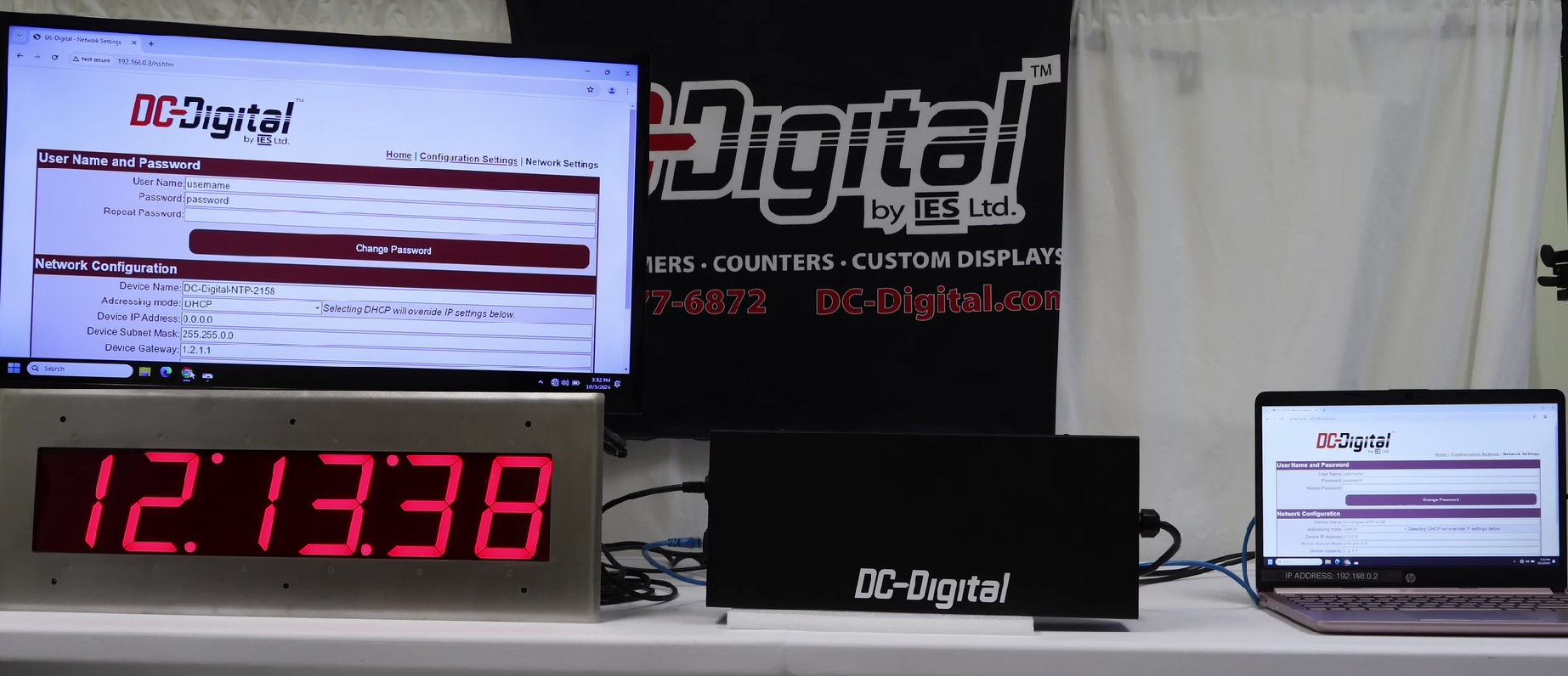
Configure your clocks before deployment with our DC-CCK Configuration Kit, designed specifically for environments where direct physical access to installed clocks is limited or restricted. This kit provides a simple, controlled way to set up and manage your clock settings before they are fully deployed on your facility’s network—making it ideal for cleanrooms, manufacturing plants, laboratories, and other regulated environments.
In many new facility builds, clocks are installed well before the space is operational. Once gowning protocols or restricted access policies are in place, accessing those clocks to configure network settings becomes difficult or impossible. Although our clocks display their IP address once assigned (typically via DHCP from the factory), that feature alone does not help when the clock is mounted behind controlled access areas. The DC-CCK Configuration Kit solves this challenge by giving you a contained, standalone network environment to configure each unit safely and efficiently.
The kit includes a compact router system housed in a portable enclosure along with a laptop interface. By temporarily disconnecting the clock from your main network and connecting it to the DC-CCK system, you create a basic, isolated network where the clock can obtain an IP address and be accessed through a web browser such as Chrome or Edge. This allows you to fully configure the clock’s network and time settings before final deployment.
Using the included IP setup utility, you can:
- Search for connected clocks on the isolated network
- Identify the assigned IP address
- Launch the clock’s internal web interface
- Access configuration settings securely
Once logged into the clock’s web interface, you can customize key parameters such as:
- Time server selection
- Time synchronization frequency
- Clock display settings
- Network configuration (DHCP or Static IP)
- Username and password credentials
The DC-CCK Configuration Kit allows you to switch between DHCP and Static IP addressing, manually define IP address ranges, adjust subnet masks, gateways, and DNS entries, and correct addressing errors without needing access to your primary facility network. If an incorrect static IP is entered and the device becomes unreachable through a browser, the IP setup utility allows you to rediscover and correct the configuration within the isolated environment.
This controlled setup process is particularly valuable in facilities where:
- Cleanroom access requires gowning procedures
- Clocks are mounted in sterile or restricted production zones
- Network security policies restrict device discovery
- IT infrastructure is complex or segmented
Because the DC-CCK operates independently of your enterprise network, it allows you to use low-level, simplified network protocols to prepare your clocks for final installation. After configuration is complete, the clocks can be deployed onto your production network with the correct addressing method—either static or DHCP—already set and verified.
The DC-CCK Configuration Kit is available as a rental solution, allowing you to configure multiple clocks during installation or commissioning phases. Once deployment is complete, the kit can be returned, making it a practical and cost-effective solution for facility rollouts.
Whether you are preparing clocks for cleanrooms, manufacturing floors, pharmaceutical production areas, or high-security environments, the DC-CCK Configuration Kit ensures your system is configured correctly, efficiently, and without disruption to regulated spaces.
See product: DC-CCK
Watch tutorial video on YouTube
Contact us to ask about our customized products!

No Comments