Bronze Date & Time Display Provides Network Control and NTP Synchronization
- By : DC-Digital sales & marketing
- Category : Clocks, Data Controlled Displays, Manufacturing, Multi-purpose, Network, Network Displays - Browser Based, Number Displays, System Synchronized Clocks, Time of Day, World Time Zone
- Tags: DC-256, Dc-Digital, Ethernet Connection, network, Network Browser Based Displays no software required, Network-NTP-Clocks, NTP-Clock, NTP-network, Synchronized System
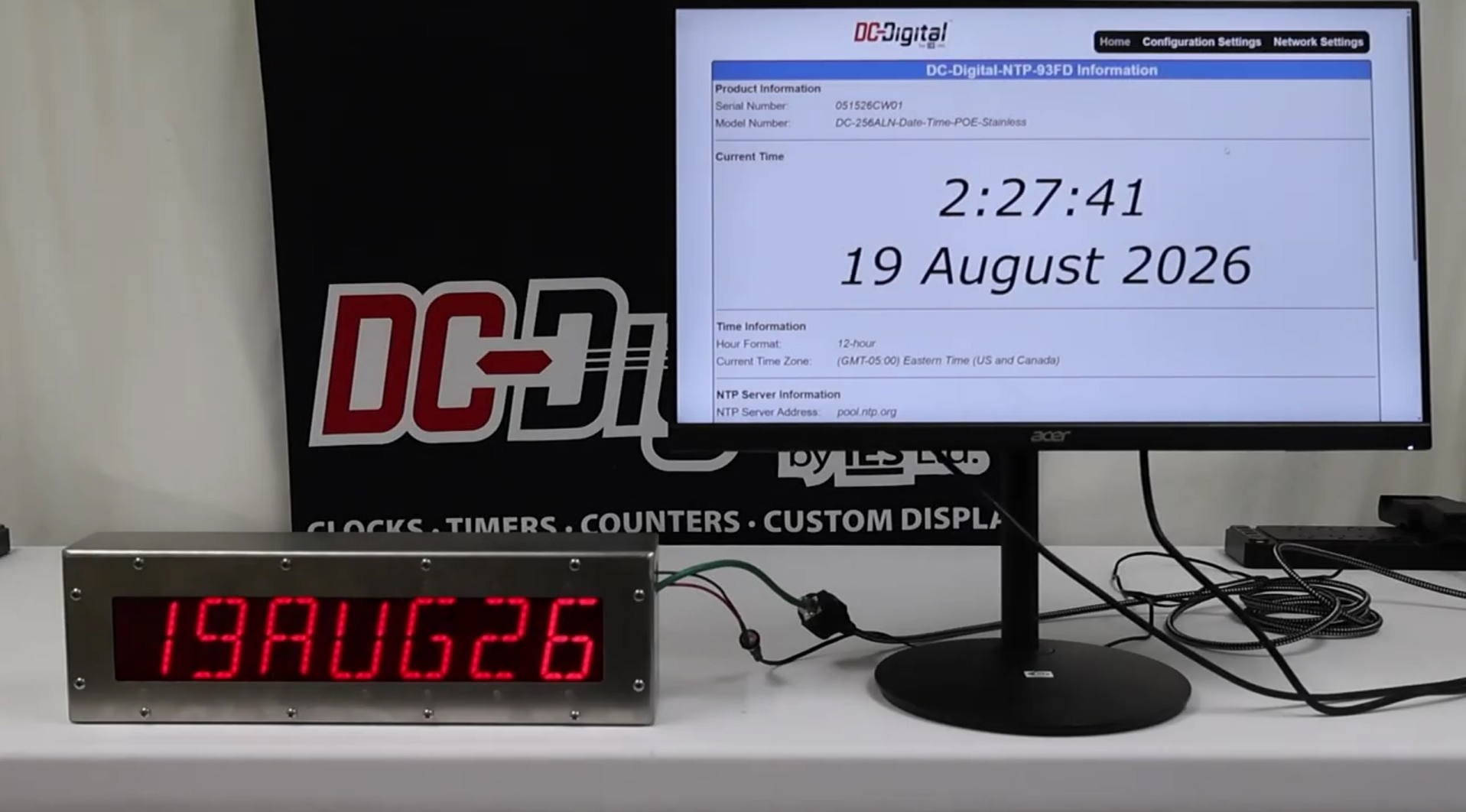
See enclosed product: DC-256N-POE-Stainless
A custom Bronze Date & Time Display was developed to provide both current time and date information on a single 14-segment LED display while incorporating network-based configuration and NTP synchronization. The display alternates between the time and date, allowing two important pieces of information to be presented from one compact display rather than requiring separate time and date displays.
The unit features a full-body aluminum enclosure with a 12V DC power connection and Ethernet connectivity. The Ethernet connection provides access to the display’s built-in webpage, giving users a convenient way to monitor the clock and configure its operating parameters through a standard network connection.
Alternating Time and Date Display
The 14-segment display is designed to alternate between the current time and date. This allows the display to provide continuously useful information while maintaining a clean, straightforward presentation.
The built-in webpage provides a view of the information currently being presented on the display. Users can also review the clock’s time configuration, including the selected hour format and time zone.
Key display functions include:
- Alternating time and date presentation
- Single 14-segment LED display
- Selectable 12-hour or 24-hour time format
- Configurable time zone
- Network-based configuration and monitoring
- 12V DC operation
- Ethernet connectivity
Built-In Webpage for Network Configuration
One of the primary functions of this custom display is its integrated web interface. Instead of requiring a separate programming device, users can access the clock through a network-connected computer and view or modify its configuration through the webpage.
The interface provides information about the current time and date, network configuration, device name, and NTP synchronization. This makes it possible for an administrator to manage the display without needing physical access to the enclosure for routine configuration changes.
The network settings are protected by a password wall to help prevent unauthorized users from changing important operating parameters. The password can be changed through the configuration interface, providing administrators with control over access to the network settings.
NTP Time Synchronization
The display can synchronize its internal time with an NTP server to maintain accurate timekeeping. In the demonstrated configuration, the unit uses time.nis.gov as its NTP source and provides synchronization information through the webpage, including when the most recent synchronization occurred.
The NTP configuration supports up to three server addresses. The system attempts to communicate with the primary server first. If that server is unavailable, the clock can move to the secondary server and then the third server, helping maintain reliable time synchronization.
Users can also configure the interval at which the display checks for updated time information.
The NTP configuration includes:
- Support for up to three NTP server addresses
- Primary, secondary, and tertiary server operation
- Automatic server failover
- Configurable synchronization interval
- NTP synchronization status information
- Time zone configuration
- 12-hour or 24-hour display format
Flexible Ethernet Network Configuration
The network interface provides several options for integrating the display into an existing facility network. The unit can be configured for DHCP, allowing the network to automatically assign an IP address, or it can be configured with a static IP address when a permanent network address is preferred.
The device name can also be customized through the webpage. In addition to identifying the display within its configuration interface, the device name can function as an mDNS name when the connected network and router support mDNS.
This can make accessing the display’s webpage easier because users can enter the device name into a compatible browser rather than needing to determine the display’s current IP address.
Password-Protected Settings
Network configuration settings can be protected with a password to reduce the possibility of unintended changes. This is particularly useful when the display is connected to a larger facility network where multiple users may have access to network-connected equipment.
Administrators can manage the password through the webpage and control settings such as the device name, Ethernet configuration, and network addressing.
Full-Body Aluminum Enclosure
The custom unit uses a full-body aluminum enclosure designed to house the LED display, electronics, power connection, and Ethernet interface in a single assembly. The enclosure provides a practical housing solution for installations requiring a self-contained digital time and date display.
Different enclosure and connection configurations can also be supplied depending on installation requirements. Available configurations can include flush-mounted, boxed, and Power over Ethernet (PoE) versions.
Network-Connected Time and Date Display
This custom Bronze Date & Time Display combines a simple alternating time and date presentation with advanced network configuration capabilities. The result is a display that can provide continuously visible information while allowing administrators to manage time synchronization, network settings, and display configuration through an Ethernet-connected webpage.
With NTP support, multiple server options, password-protected configuration, DHCP or static IP operation, mDNS capability, and a full-body aluminum enclosure, the system can be adapted to a variety of environments where accurate time and date information needs to be displayed and managed through a network.
Visit DC-Digital website
Contact us to ask about our customized products!
No Comments